회사의 기술 스택이 Django, Jquery, Angular 에서 Node, Graphql, React 로 바뀌고 있다.
리팩토링이 한 단계씩 진행되고 있는데, 이번에 처음으로 테스트 코드 작성에 참여했다.
Jest
테스트 코드 작성을 용이하게 도와주는 자바스크립트용 프레임워크다.
Jest is a delightful JavaScript Testing Framework with a focus on simplicity.
공식 홈페이지 : https://jestjs.io/
사용했던 코드를 간단히 살펴보면
describe('ExamService', () => {
  let user: User = null

  beforeAll(async () => {
    user = await createUser()
  })

  describe('getExam', () => {
    test('returns Exam instance', async () => {
      const { contentService, examService } = createServices(sequelize, user)

      const company = await createCompany()
      const exam = await createExamModel(contentService, company)

      const result = await examService.getExam(exam.id)
      expect(result).toMatchObject({ id: exam.id })
    })
  })
})describecreates a block that groups together several related teststestmethod which runs a testbeforeAllruns a function before any of the tests in this file run.afterAllruns a function after all the tests in this file have completed.expectfunction is used every time you want to test a value
위 기본적인 함수들만 잘 활용하여도 테스트 코드를 용이하게 짤 수 있었다.
BUT,
에러를 잡는 test 코드는 약간의 애를 먹었다.
describe('buildWhereOptionsFromFiltersForExamQuestion', () => {
  test('throw when examID is invalid', async () => {
    expect.assertions(1)
    const userModel = await createSuperUser()
    const { examService } = createServices(sequelize, userModel)
    try {
      await examService.buildWhereOptionsFromFiltersForExamQuestion({ examID: -1 })
    } catch (error) {
      expect(error).toEqual(new UserInputError('invalid examID'))
    }
  })
})
jest 공식문서를 뒤져서 에러를 잡을 수 있는 방법 두 가지를 찾았다.
-
.toThrow(error?)함수 -
try/catch 혹은
.rejects함수를 활용한 error handling
두 가지 방법 모두 시도해본 결과, 무슨 이유인지 정확히 파악하지 못했지만 첫 번째 방법이 작동하지 않아 두 번째 방법으로 해결했다.
당면했던 문제들
1. SequelizeUniqueConstraintError: Validation error
이 문제는 Jest와 관련된 문제는 아니였다. migration 파일에 정의된 unique한 컬럼이 있었는데, 테스트 코드 중 이 유니크한 컬럼 값으로 다른 row에 이미 할당된 값을 주어 발생한 에러였다.
  content_id: {
    type: DataTypes.INTEGER,
    unique: true,
    allowNull: false,
  },
Django 에선 models.py 에 정의된 바에 따라 migration 파일이 생성되었다 보니, migration 파일을 따로 살펴볼 필요없이 작업하고 있는 해당 모델의 models.py 만 살펴봤었다.
때문에 이번 작업시에도 모델이 정의된 파일만 살펴보며 작업하다가 발생한 문제였다.
node 에선 아직 정확히는 모르겠지만, models 디렉토리에 정의해 둔 모델 정보와
migrations 디렉토리에 정의된 migration 정보가 일치하지 않을 수 있다.
그 이유는 python manage.py makemigrations 명령어로 migration 파일을 자동 생성하는 Django와 달리 node의 이 migration 파일은 다른 팀원이 직접 만든 코드라고 한다.
앞으로 작업 시, migration 파일에 정의된 테이블 정보도 함께 보며 작업해야 함을 배웠다.
2. Jest encountered an unexpected token
Here’s what you can do:
- To have some of your “node_modules” files transformed, you can specify a custom “transformIgnorePatterns” in your config.
- If you need a custom transformation specify a “transform” option in your config.
- If you simply want to mock your non-JS modules (e.g. binary assets) you can stub them out with the “moduleNameMapper” config option.
You’ll find more details and examples of these config options in the docs: https://jestjs.io/docs/en/configuration.html
위와 같이 안내된 에러 로그를 보고, jest 관련 설정 문제라고 판단했다.
jest 공식 문서를 보고 처음부터 설정을 다시 해봤지만.. 실패..
Jest encountered an unexpected token 에러에 대한 구글링으로 jest.config.js 수정 및 관련 세팅 변경의 반복.. 거듭되는 실패..
이 에러는 사실 로컬 환경에서는 발생하지 않았다. Github에 PR을 보내면 자동으로 실행되는 Node CI 에서 발생했다. 우리는 Node CI로 node 10 버젼과 12 버젼의 빌드 테스트를 하고 있다.
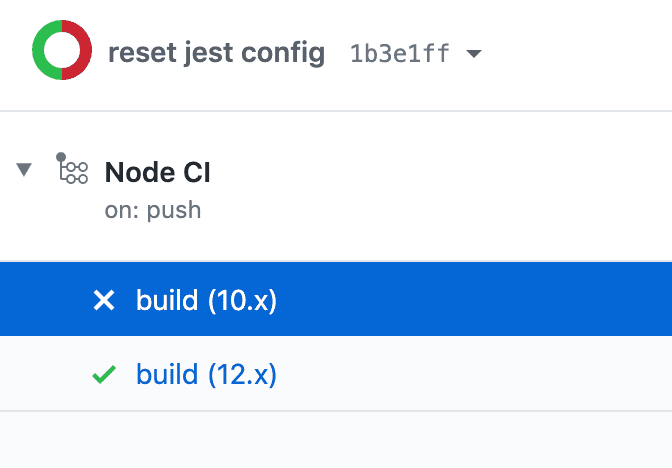
로컬에서는 문제 없었기에 PR을 보냈는데, 노드 10 버젼에서만 에러가 발생해 의문이 생겼다. 팀원에게 물어보니, 로컬환경이 노드 12 버젼이라 그렇단다.
설정 문제가 아닐 수도 있겠다는 생각이 들었고,
cookie = new _cookie.CookieImpl(null, null, null);
             ^
    SyntaxError: Unexpected token =
팀원이 에러가 발생했던 코드를 보고, 코드 문제일 수도 있다고 하며 해당 부분을 수정해주니 에러가 해결됐다.
@lazy public get cookie(): Cookie {
  return new CookieImpl(null, null, null)
}
위 코드가 수정된 코드이다. 이 문제가 발생했을 때, 코드엔 빨간 줄이 뜨지 않아 코드에 이상이 있을 꺼라고 접근하지 않았다.
아직 자바스크립트 기본기가 미숙하고, 리팩토링 프로젝트의 코드를 제대로 이해하지 못한 탓이다. 공부하자.
전 체 회 고
테스트 코드는 비즈니스 로직을 테스트하기 위한 코드이다. 테스트 코드를 작성하다 잘못된 비즈니스 로직을 발견하면 이는 수정해야 한다. 하지만, 테스트 케이스를 위한 비즈니스 로직의 수정이 아닌지 생각해봐야 한다.